Alchemy Subgraph Migration: How to Migrate Your Alchemy Subgraph on OnFinality
Migrate your Alchemy subgraph with ease using this complete subgraph migration guide and move from Alchemy to OnFinality in minutes.
Alchemy is stopping their support for indexing services, stranding a lot of projects in search of an alternative that is reliable, fast and more cost effective. Onfinality has been running indexing infrastructure since the last 5 years without having downtime. This guide shows you how to migrate your subgraph from Alchemy to OnFinality.
This article gives you a crisp overview followed by a practical walkthrough designed for developers, growth teams, and product teams working on dApps with complex indexing needs.
Table of content
- Indexing on OnFinality
- Key Benefits of Migrating Your Subgraph to OnFinality
- How to Migrate Your Subgraph from Alchemy to OnFinality
- Common questions about subgraph migration
- Summary
- About OnFinality
Indexing on OnFinality
Indexing on OnFinality gives developers a fast and reliable way to process blockchain data across more than 40+ networks. With support for both The Graph and SubQuery, OnFinality lets you deploy subgraphs and indexers without managing servers, sync bottlenecks, or complex infra. You get global distribution, predictable performance, and easy scaling for any dApp that depends on real time or historical data. It is the simplest path to production grade indexing that just works.
Onfinality has processed more than 28 billion+ over lifetime, with over 99.95% uptime and it indexes more than 90 projects.
Key Benefits of Migrating Your Subgraph to OnFinality
Migrating to OnFinality unlocks advantages that matter for builders shipping fast.
1. Faster Sync Times: OnFinality’s infra is optimised for fast indexing and quick historical sync.
2. Higher Reliability: Global distributed nodes reduce downtime and ensure stable availability.
3. Multi Chain Support: Index across EVM chains, rollups, modular stacks and more. OnFinality is chain agnostic.
4. Scalable Infrastructure: Designed for dApps that grow from testnet to millions of users.
5. Full Compatibility with The Graph and Subquery: Deploy your subgraph exactly as you would on any The Graph hosted endpoint.
How to Migrate Your Subgraph from Alchemy to OnFinality
Prerequisites
Before getting started, ensure you have:
- The IPFS CID of the current version of your project deployed on Alchemy
- An account on OnFinality’s Indexing Service
Step 1: Create Your Indexing Project
Log in to OnFinality Indexing and start by clicking on "Create Project". You'll be taken to the new project form. Start by selecting what project type you would like to deploy (The Graph), and then follow the steps and enter the following (you can change this in the future):
- Project Name: Name your project.
- Description: Provide a description of your project.
- Database: Premium customers can access dedicated databases to host production Subgraph projects from. If this interests you, you can contact sales@onfinality.io to have this setting enabled.
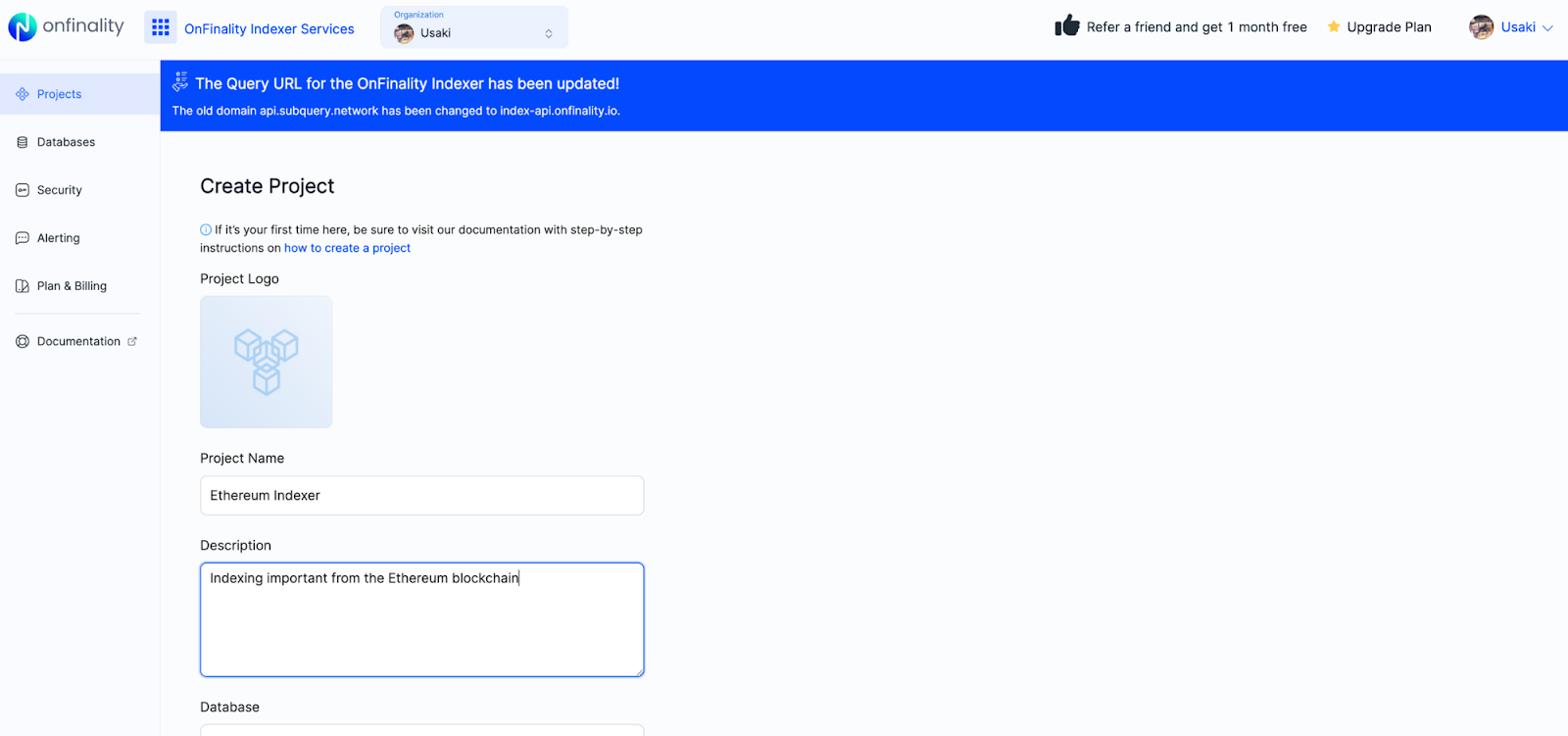
Create your project and you'll see it on your OnFinality’s Indexing Project's list. Next, we just need to deploy the project.
Step 2: Deploy your Project
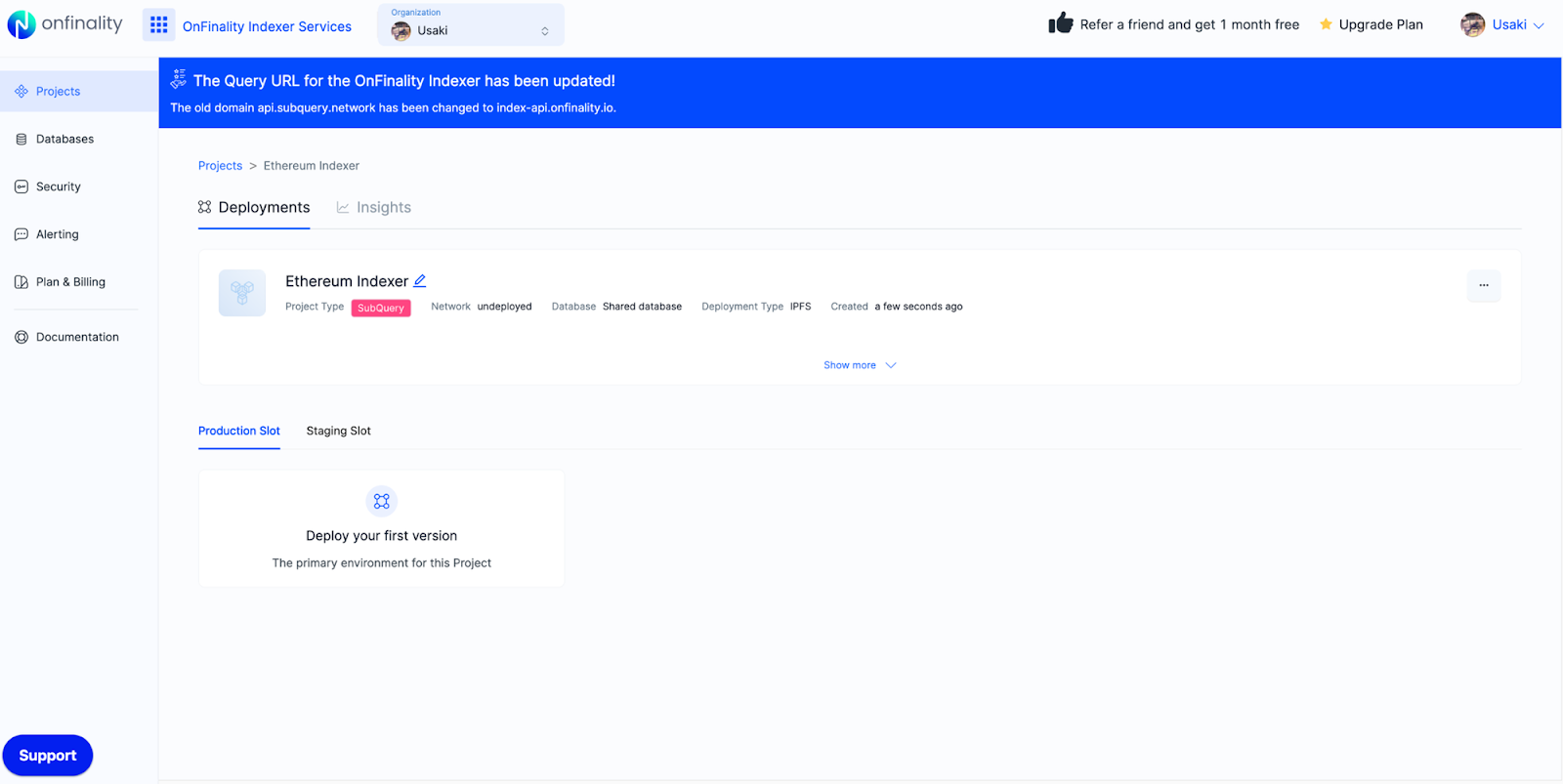
While creating a project will setup the display behaviour of the project, you must deploy a version of it before it becomes operational. Deploying a version triggers an indexing operation to start, and sets up the required query service to start accepting GraphQL requests. You can also deploy new versions to existing projects here.
With your new project, you'll see a "Deploy your first version" button. Click this, and fill in the required information about the deployment:
Opens image in full screen
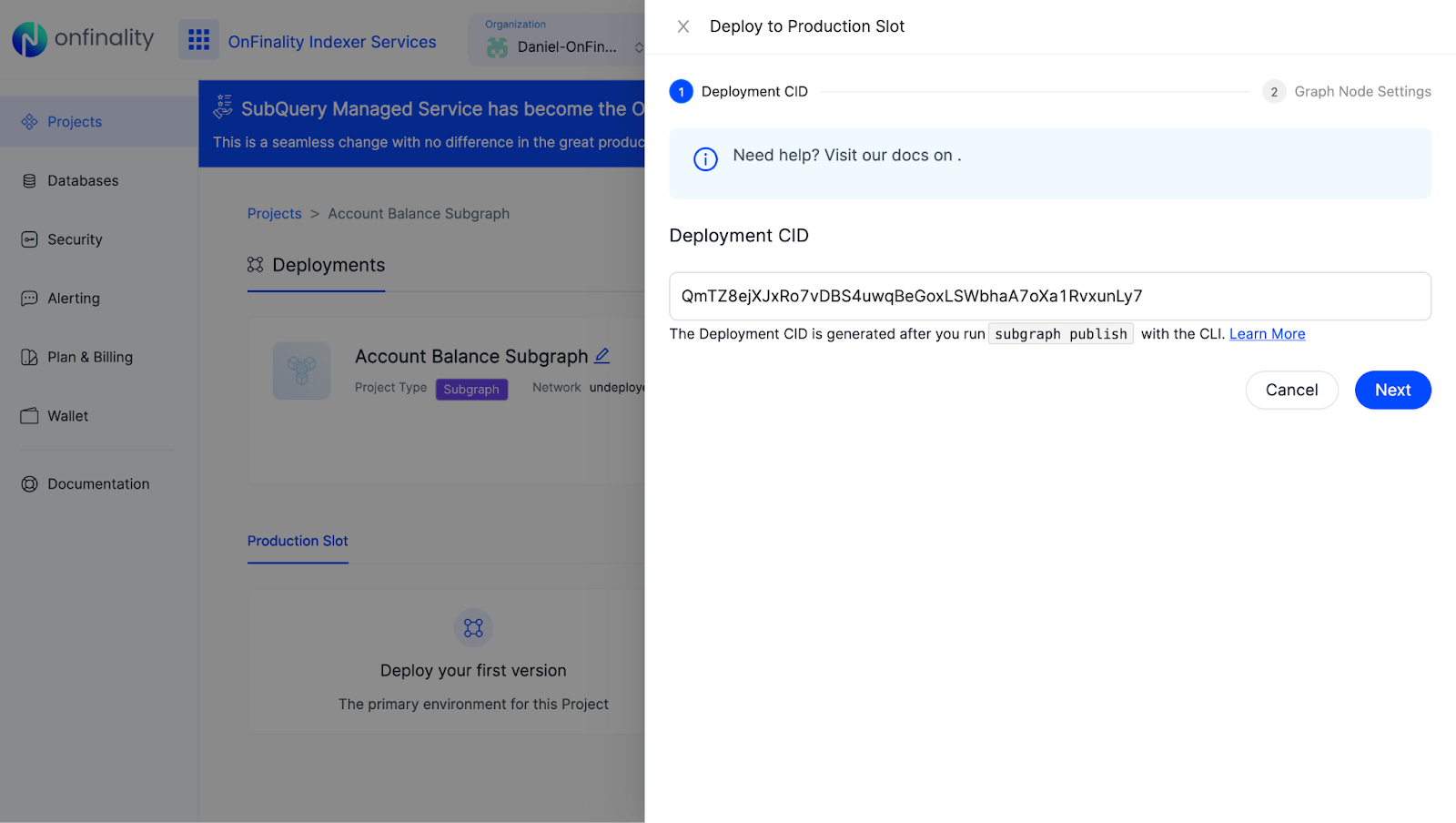
- CID: Provide your IPFS deployment CID. Retrieve this by following the steps above to retrieve the IPFS CID
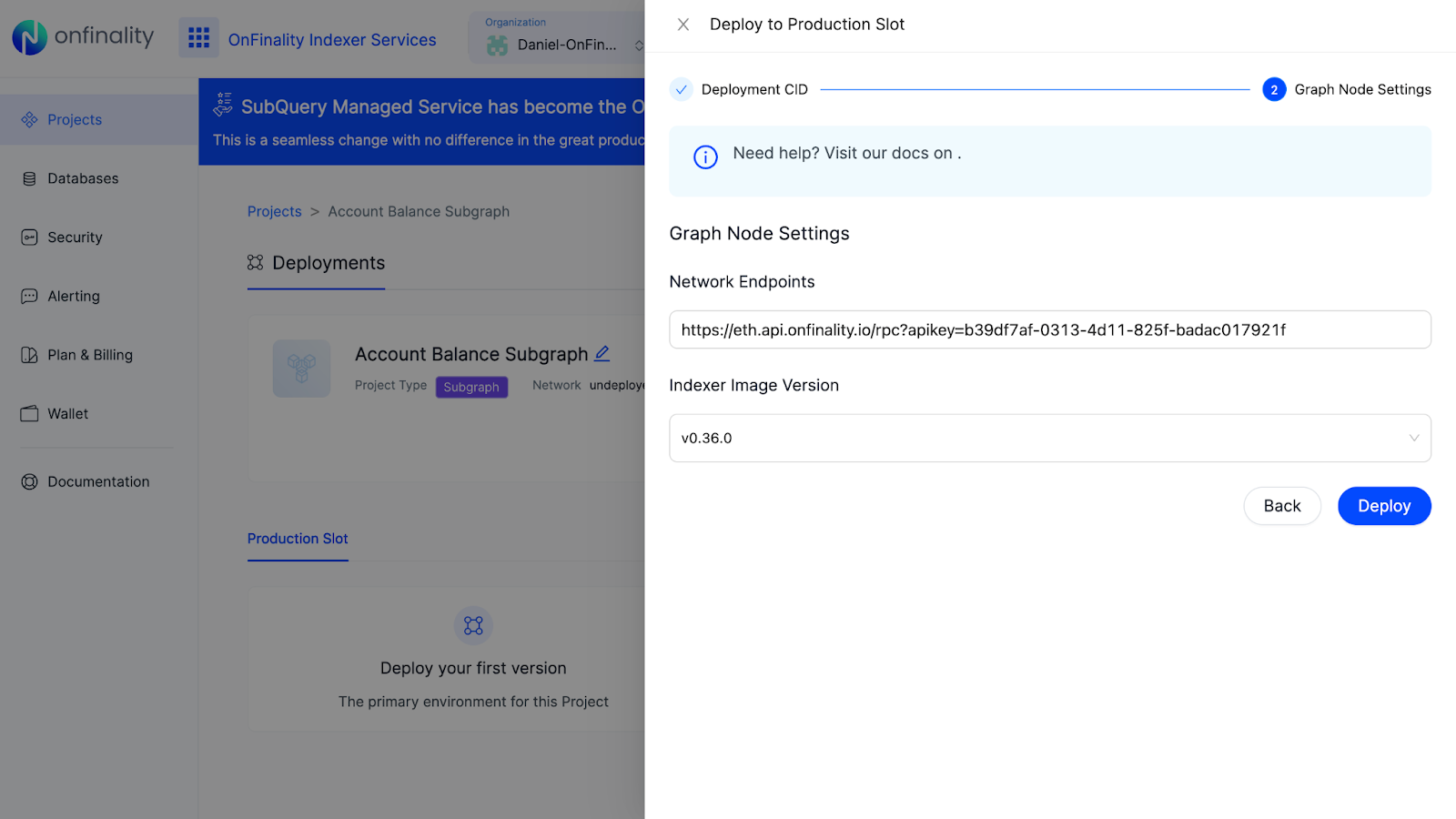
- Network Endpoints: Provide one or more RPC endpoints to read the data you wish to index from the chain. Check out Onfinality’s API Plans for higher rate limits which can lead to faster indexing speed.
If deployed successfully, you'll see the indexer start working and report back progress on indexing the current chain. This process may take time until it reaches 100%.
Step 3: Migrate your Application to OnFinality
Obtain your OnFinality Query Endpoint from the OnFinality Indexing portal
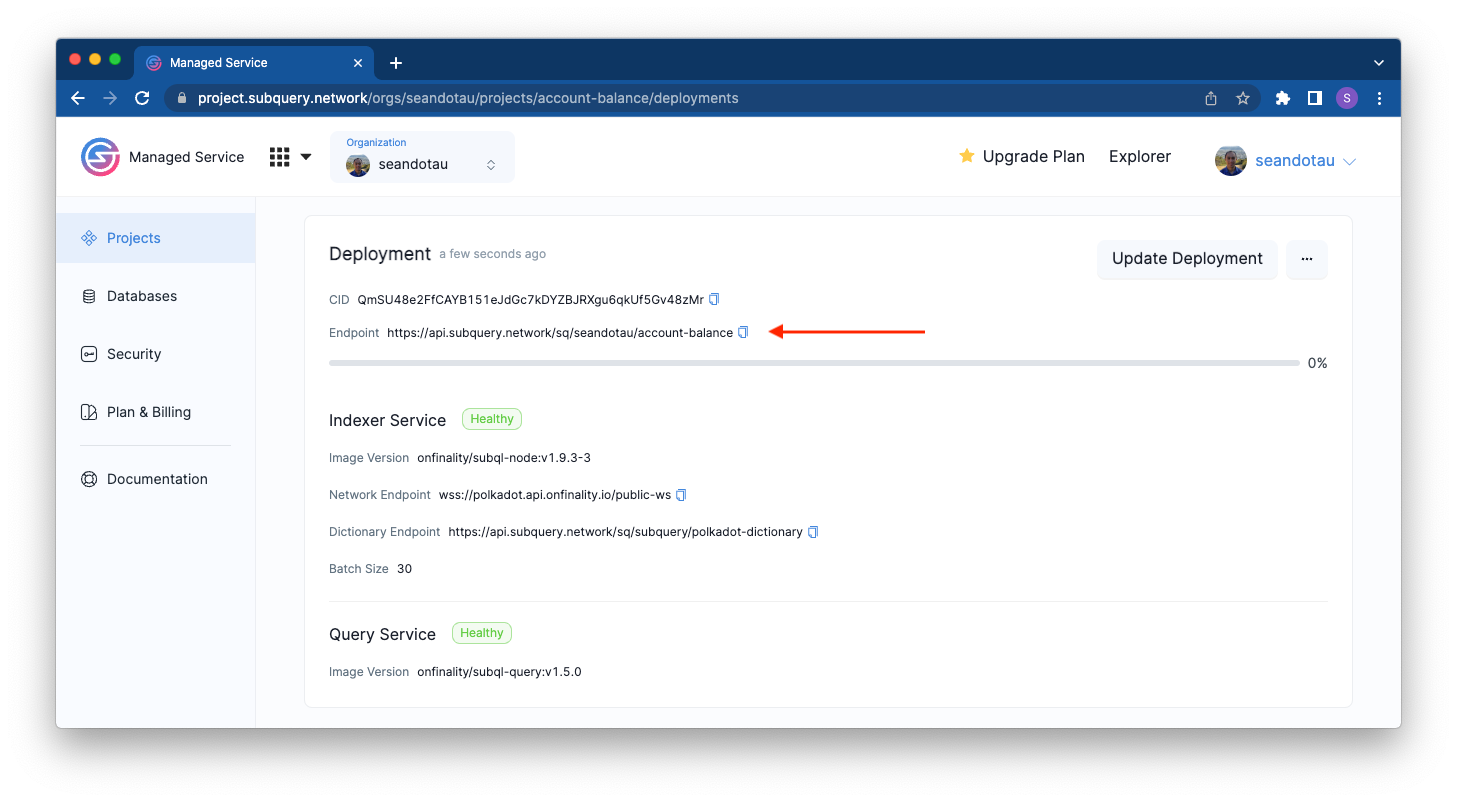
Replace the Query endpoint in your application to use your new endpoint.
Summary
Subgraph migration is one of the fastest upgrades you can make to improve your dApp performance. It takes a few minutes and gives long term gains in reliability, speed, and scaling.
Key takeaways:
- Migration is simple
- OnFinality provides faster indexing and multi chain support
- Your existing code works with minimal edits
- Migrate your subgraph and unlock better infra instantly
If you want to explore more indexing guides, visit our docs.
Common questions about subgraph migration
How long does a subgraph migration take?
Most migrations take less than 10 minutes to set up. Complex multi source subgraphs may take longer due to initial sync.
Will my indexing start from block zero?
This depends on your configuration. You can define your startBlock in the manifest to optimise performance.
Is OnFinality compatible with all Alchemy subgraphs?
Yes. If it runs on The Graph or Subquery, it runs on OnFinality with no code changes other than endpoint updates.
About OnFinality
OnFinality is a blockchain infrastructure platform that serves hundreds of billions of API requests monthly across more than 130 networks, including Avalanche, BNB Chain, Cosmos, Polkadot, Ethereum, and Polygon. It provides scalable APIs, RPC endpoints, node hosting, and indexing tools to help developers launch and grow blockchain networks efficiently. OnFinality’s mission is to make Web3 infrastructure effortless so developers can focus on building the future of decentralised applications.